
ClientWorkSystem macOS App Testing Begins: A Desktop Workflow For Consistent Content Marketing
TL;DR
- ClientWorkSystem is now preparing its macOS app for testing as adoption grows.
- The move from browser dashboard to desktop app matters because content work needs to stay visible.
- Three tools worth knowing in this build are Record, Script, and Calendar.
- The dashboard shows real workflow signals: 245 comments, 26 ready scripts, and 15 scheduled posts.
- For video marketing for UK businesses, consistency is usually a workflow problem, not a motivation problem.
What Is This? (Short Answer)
ClientWorkSystem is LPV Agency’s content operations dashboard, now being prepared as a macOS app ready to test.
It is designed to help business owners turn quick thoughts into posts, scripts, replies, and scheduled content without letting marketing disappear behind client work, calls, and admin.
Alex summed up the milestone simply: “It’s really amazing to see how the adoption is growing and how much more people are using the app.” That growth creates a different kind of pressure: the system has to feel clear before it feels clever.
For LPV Agency, this is part of a larger social media autopilot for UK businesses: clients record a short video, and the system helps turn that input into useful marketing output.
A macOS App Built Around Visibility, Not Vanity
The screen shows ClientWorkSystem running in a macOS environment, with installer and version windows layered over the dashboard. It feels less like a concept and more like a working product moving into everyday use.
The key change is practical. A browser dashboard is useful, but a desktop app can sit closer to the user’s daily workflow and keep the next content action visible.
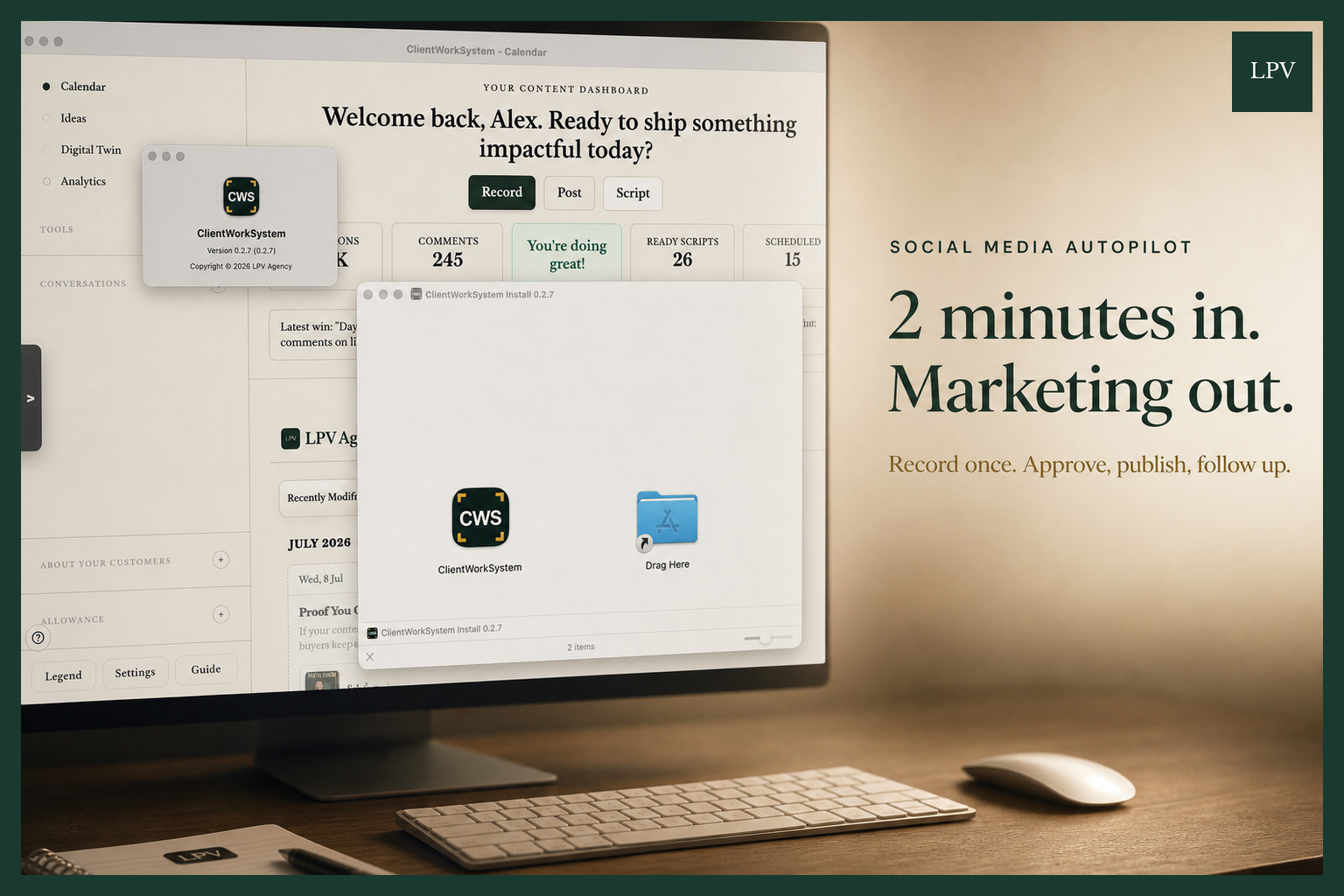
ClientWorkSystem macOS app testing screen showing the content dashboard, installer window, About dialog, Record, Post, Script, Calendar, Digital Twin, Analytics, Conversations, and version 0.2.7.
The visible dashboard is addressed to Alex and includes action buttons for Record, Post, and Script. The sidebar also shows Calendar, Ideas, Digital Twin, Analytics, and Conversations, which makes the system feel like a central workspace rather than a single-purpose posting tool.
The numbers matter because they show activity, not theory: 245 comments, 26 ready scripts, and 15 scheduled posts. Those are the kinds of operational signals that matter when building done for you social media London businesses can actually rely on.
Three Tools Worth Knowing Inside This Build
This is not an official ranking. It is a clean look at three tools worth knowing from the current macOS test build.
- Record: The fastest way to turn a quick owner thought into usable content.
- Script: A place to shape that thought before it becomes a post.
- Calendar: The part that stops good ideas getting lost between client work, calls, and admin.
That sequence is important for male business owners, consultants, trades, professional services firms, and B2B teams who know marketing matters but do not want to live inside content tools all day.
Record captures the raw insight. Script turns that insight into something structured. Calendar makes sure it has somewhere to go.
How Does This Work?
The workflow starts with a small input: a quick owner thought, usually the kind of thing that would otherwise stay in someone’s head or disappear after a busy call.
From there, ClientWorkSystem gives the idea a path. It can become a script, move into scheduled content, connect with customer conversations, and feed wider authority building for professionals.
This is where automated video marketing services UK businesses need to become more operational. Automation is not just posting more often; it is reducing the number of decisions needed to stay visible.
The presence of Digital Twin and Analytics in the dashboard also points to a more advanced layer. Digital twin script testing can help shape voice, positioning, and content angles before ideas become public posts.
Who Is This For?
This is for UK businesses that understand the value of social media but do not want marketing to become another full-time job.
It is especially relevant for service businesses in London, Harold Wood, Romford, and across the United Kingdom where reputation, expertise, and local trust drive buying decisions.
For a B2B video marketing agency London audience, the app is not about chasing trends. It is about making the next post, next reply, next script, and next customer insight easier to act on.
What Does It Cost?
The notes do not include pricing, so the honest answer is that cost is not shown in this test screen.
What the screen does show is the kind of value the system is trying to protect: fewer lost ideas, clearer content planning, and a more consistent publishing rhythm.
For local SEO digital marketing Harold Wood businesses, that consistency can matter because search visibility and social proof both compound over time.
What Are The Risks?
The biggest risk is assuming software alone creates consistency. A tool can support the workflow, but the content still needs a clear point of view from the business owner.
Another risk is overcomplicating the system too early. More usage creates pressure, and that is why clarity matters before cleverness.
A final risk is separating content from customer conversations. The dashboard’s Conversations area is important because replies, comments, and insight often contain the best future content ideas.
Key Takeaways
- ClientWorkSystem macOS version 0.2.7 is ready to test.
- The product is moving from browser dashboard to desktop app.
- Adoption is growing, which makes usability and clarity more important.
- Record, Script, and Calendar form a simple content workflow.
- The visible metrics show active usage: 245 comments, 26 ready scripts, and 15 scheduled posts.
- Consistency is not mainly a motivation problem; it is a workflow problem.
Implementation Checklist
- Capture quick owner thoughts before they disappear.
- Turn raw ideas into scripts before trying to publish them.
- Schedule content in a visible calendar, not a scattered notes file.
- Review comments and conversations for customer language.
- Use analytics to understand what deserves to be repeated or refined.
- Connect the workflow with CRM and follow-up systems where useful, including HighLevel CRM integration.
Common Mistakes
- Waiting until there is “time for marketing” instead of building a repeatable workflow.
- Recording ideas but never turning them into scripts.
- Writing scripts but not scheduling them.
- Ignoring comments as a source of future content.
- Adding clever features before the core workflow feels clear.
Why This Matters For UK Business Content
LPV Agency’s positioning is simple: many UK businesses hate marketing but understand its importance. The promise is to make social media feel less like a weekly burden and more like an operating system.
That is why this macOS test matters. If the next post, script, reply, and customer insight all live in one place, content feels less like a task and more like a process.
For businesses in London, Harold Wood, Romford, and beyond, the advantage is not just posting more. It is building a content workflow that keeps authority visible even when the owner is busy serving clients.
Closing Thought
ClientWorkSystem reaching macOS testing is a practical milestone for LPV Agency and its clients. It shows a product moving closer to the daily reality of how busy businesses actually work.
The real lesson is clear: better content consistency rarely comes from more motivation. It comes from a workflow that makes the right action obvious.
For UK businesses looking for a social media autopilot, this is the part worth watching.
FAQ: Practical Questions People Ask
What is the fastest way to apply ClientWorkSystem macOS App Testing Begins: A Desktop Workflow For Consistent Content Marketing in a real business?
Start with one repeatable workflow, define the outcome, and automate only that part first. For example: More usage creates a different kind of pressure: the system has to feel clear before it feels clever.
That is why this macOS test matters. ClientWorkSystem is moving from a dashboard people use in the browser to an app that can sit on the desktop and keep the work visible.
Three tools worth knowing inside this build: 1. Record – the fastest way to turn a quick owner thought into usable content.
2.
How does this approach improve consistency and trust?
It creates a repeatable publishing cadence with clearer messaging and fewer manual delays, which improves audience confidence over time.
Do small teams need expensive tools to implement this?
No. A lightweight stack can work if it covers recording, editing, scheduling, and analytics with a clear process and ownership.
What should be measured first to validate results?
Track output consistency, content completion time, and conversion indicators (qualified leads, booked calls, or sales conversations).
Why is LPV Agency focusing on this strategy?
Because it reduces execution friction while improving visibility and lead quality. The goal is practical growth, not vanity metrics.